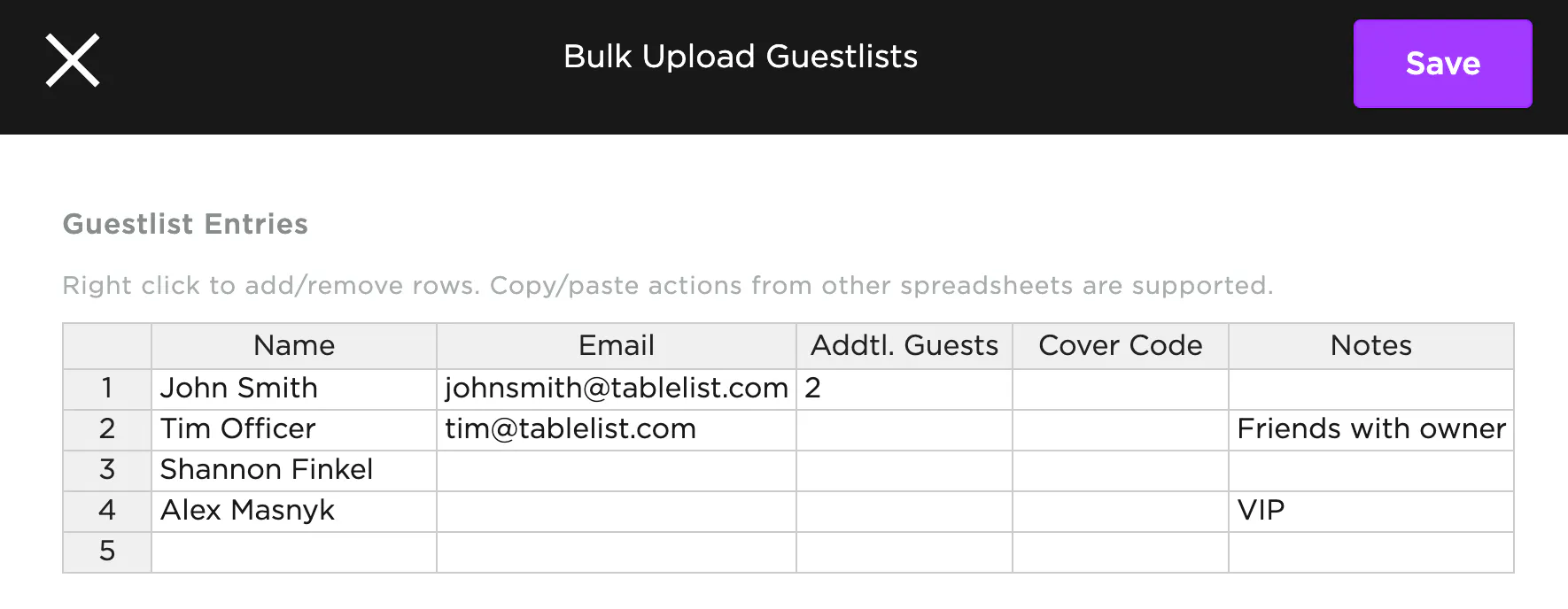
To bulk-add guests on the web, we recommend having a list ready in Excel, Sheets, or a similar program in this format:
Name | Email | Addtl. Guests | Cover Code | Notes
- Go to the Admissions tab
- Select the date at the top left
- Click the three purple dots on the right
- Click Bulk Upload Guest Lists
- Copy and paste your list from Excel/Sheets in the proper format
- Not all fields are required -- fill out as much or as little as you want, but always include the Name
- "Addtl. Guests" = the number of additional guests in the customer's party
- If John Smith is bringing 2 guests, put "2" in that column
- If John Smith is solo, leave it blank or put "0"
- Press Save
The default attribution for all guests will be whoever is logged in and doing the upload.
Bulk-added customers won't receive a QR code in their confirmation email. Their names get added to the Admissions tab for your chosen date, and you can check them in manually.